Video monitoring can be difficult in remote and off-grid locations where cellular, LTE and radio networks provide limited or unreliable coverage. Satellite connectivity offers a way to transmit live video, audio and images from these locations, helping organizations maintain visibility of valuable assets and critical operations.
This guide explains how Ground Control combines satellite connectivity, edge computing and video compression to support remote monitoring and surveillance.
Why Use Satellite for Remote Video Monitoring?
Iridium Certus 100 provides an IP connection with global coverage anywhere on Earth with a clear view of the sky. This makes it possible to connect cameras in remote locations where terrestrial networks are unavailable, affected by interference or unable to deliver suitable video quality.
Satellite can be used as the primary connection or as a failover option when cellular connectivity is lost.
How Does Remote Video Monitoring Over Satellite Work?
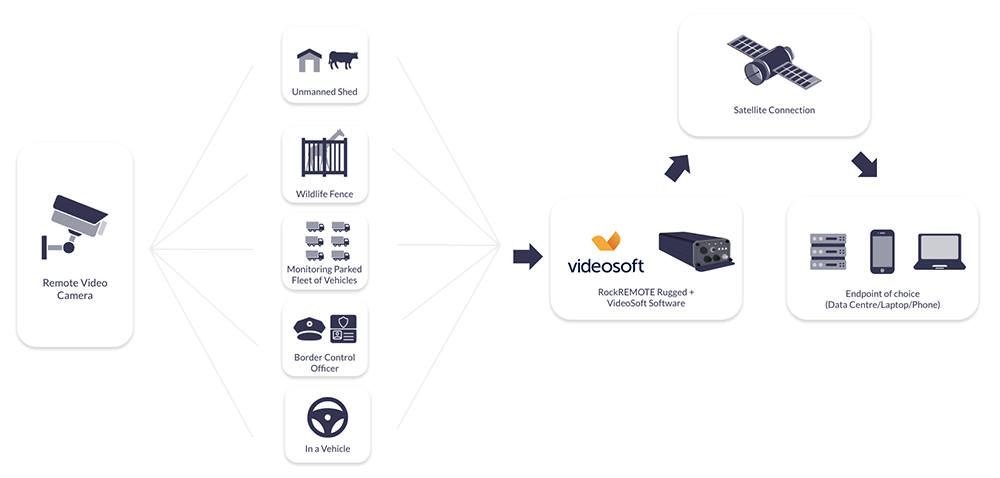
The solution connects USB or IP cameras to RockREMOTE Rugged, which provides the satellite and cellular communications link. Videosoft’s edge application runs on RockREMOTE Rugged’s four-core processor, compressing video before it is transmitted over Iridium Certus 100.
This allows the system to support real time, low-bitrate video from multiple cameras while also retaining full quality recordings.
Operators can retrieve high resolution images or selected video footage when more detail is required. Videosoft Total Recall™ also allows areas of interest within an image to be selected for enhancement, helping reduce the amount of data transmitted over satellite.
Key Considerations

Video Compression
Video generates large amounts of data, so compression is essential when working with a satellite connection.
Videosoft adapts and compresses the video at the edge, helping maintain useful image quality while reducing bandwidth requirements and satellite airtime costs.

Camera Integration
The solution supports both USB and IP-connected cameras.
RockREMOTE Rugged also provides serial, digital and LAN connectivity, allowing cameras and other remote equipment to use the same communications gateway.

Primary or Failover Connectivity
RockREMOTE Rugged combines LTE and Iridium satellite connectivity.
It can use satellite as the primary connection in locations without terrestrial coverage or provide network resilience by switching from LTE when cellular service becomes unavailable.

Mobile or Fixed Installations
The solution can be used in stationary installations or on moving assets, including vehicles.
This makes it suitable for security, surveillance and operational monitoring across a range of remote environments.

Rugged Remote Deployment
RockREMOTE Rugged is IP67-rated and designed for use in harsh conditions.
Remote device management provides visibility of the communications equipment and can reduce the need for site visits.

Secure Video Transfer
Videosoft supports industry-standard encryption for video transmission.
Ground Control’s Cloudloop Network Operating Centre also provides firewall management and real-time visibility of network traffic.
RockREMOTE Rugged and Videosoft
RockREMOTE Rugged provides the connectivity and processing required to run Videosoft’s application at the edge.
Together, they support:
- Live, low-bitrate video
- Multiple USB or IP cameras
- Audio transmission
- Full quality local recording
- High resolution image and video retrieval
- LTE connectivity with Iridium satellite failover
- Remote device and firewall management
- Fixed and mobile deployments.
Here to Help
For more information on our video compression satellite solution, delivered in real time and available anywhere across the globe with a clear view of the sky, please call us on us on +44 (0) 1452 751940 (Europe, Asia, Africa, Oceania) or +1.805.783.4600 (North and South America); email hello@groundcontrol.com, or complete the form.