Remote Monitoring and Maintenance

Remote Troubleshooting
Perform remote actions to synchronize, reboot, connect or disconnect, issue SMS commands, or perform firmware upgrades. Troubleshoot and control your devices remotely.
Real Time Monitoring
Check your device status, fetch GPS coordinates, and map device locations. Group devices and set up alerts for unexpected activity and downtime. Simplify how you organize and monitor your device behavior.
Advanced Configuration
With helpful search functionality and filters, find your remote devices quickly. Easily download system logs for troubleshooting. Store and retrieve device configuration snapshots, where applicable.

Historical Behavior
Investigate past interactions with your devices and previous control messaging. Check through a view of the history of commands sent to each device to inform necessary device upgrades.
Action a Reboot
Inevitably, devices don’t always behave the way you expect. If things get glitchy and your data’s not coming through as anticipated, or worse still, you don’t know if your device is responding, Cloudloop Device Manager (CDM) enables that most important action: the remote reboot.
Query Your Device Location
For a real-time GPS fix, Cloudloop Device Manager lets you override any existing tracking schedule so you can query the device’s location.
You’ll know if your device is alive, where it is right now, and whether it’s on the move. Supporting faster recovery of your assets and enhanced security in the event of loss or theft.
Remote Firmware Updates
For an essential event timeline and device information, create custom connection alerts and notifications, and access service and system logs to enable remote troubleshooting.
Perform Over The Air (OTA) software updates to fix bugs, enhance security, and ensure your devices are running the latest features.
Cloudloop Device Manager gives you access and control of your assets 24/7, from any location.
Which Devices Can I Manage?
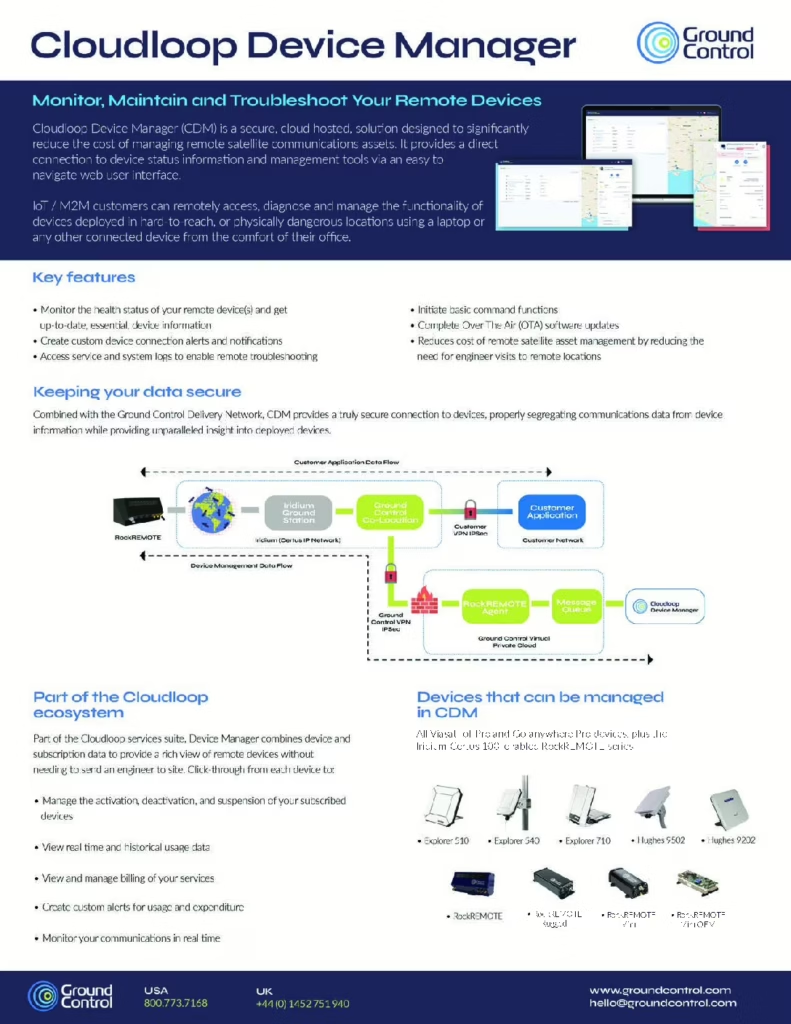
Today, CDM is available for for all Viasat IoT Pro and Go-anywhere Pro devices, in addition to the Iridium Certus 100-enabled RockREMOTE , RockREMOTE Rugged, RockREMOTE Mini, and RockREMOTE OEM.
We’re working hard to add more devices and services to the list.
Download CDM Data Sheet| Service | Iridium Certus | Viasat IoT Pro | Viasat Go-anywhere Pro |
|---|---|---|---|
| Default Connection Method: | Iridium Messaging Transport (IMT) | SMS | SMS |
| Traffic Monitoring & Alerts: | ✓ | ✓ | ✓ |
| Set & Update Location | ✓ | ✓ | ✓ |
| Device System Information | ✓ | ✓ | ✓ |
| Satellite Modem Information | ✓ | ✓ | ✓ |
| Cellular Modem Information: | ✓ | ✓ | N/A |
| Connection Status Information: | ✓ | ✓ | ✓ |
| Device Status Information | ✓ | N/A | N/A |
| Device Log Retrieval | ✓ | ✓ | ✓ |
| Reboot Device | ✓ | ✓ | ✓ |
| Remote Software Update: | ✓ | ✓ | ✓ |
| Initiate IP Connection: | N/A | ✓ | ✓ |
| Remote Configuration | N/A | ✓ | ✓ |
Frequently Asked Questions
CDM service data can be transmitted using a number of routes depending on the satellite network service. This will be done using the most cost efficient route as default (usually out-of-band connectivity) and only when initiated by the operator to ensure that operational costs remain completely controlled.
Where available, CDM uses a communications channel which is separated from the main data communications stream, often providing a far cheaper method of communication for device status information.
For Go-anywhere Pro and IoT Pro, SMS is utilized for this purpose which transmits short commands to the device initiated from the CDM user interface which are then actioned and responded to by the device.
For Certus 100 and RockREMOTE, the Iridium IMT service is used for this purpose, providing an efficient communication mechanism for device status data.
Where there is a need for greater data capacity or an out of band mechanism is not available, communication over the primary IP connection can be used for CDM data.
This will be used in scenarios such as remote software updates when connecting directly to the Go-anywhere Pro device web user interface.
Yes. By setting device connection alerts and notifications, you’ll improve your visibility of problem devices.
Cloudloop Device Manager, monitoring and alert functionality enables rapid identification of potential device issues visualised on a map based view and via Cloudloop user alerts.
Devices can be monitored individually or added to a monitoring group, with last-seen time thresholds set based on when devices last transmitted data over the satellite network.
More From Cloudloop

Cloudloop Tracking
Stay connected to your fleet or team with real-time tracking and customizable alerting options.

Subscription Manager
Activate devices, review subscriber thresholds, and organize billing groups. So that your airtime accounts work for you
Cloudloop NOC
Gain expert support and live visibility into network performance, uptime, and traffic trends 24/7.
Cloudloop Data
Oversee your data management and control data flow, choosing from a broad range of fully integrated destinations.
See More From CDM
We believe in making satellite connectivity as straightforward as possible to manage. Leaving you free to focus your energy on your application or operation.
If you’d like a demo of Cloudloop Device Manager, or a chat about technical specifications, or just more information, please complete the form, and one of our team will be in touch.