Last updated
Satellite Data Delivery for Any Logger: RockREMOTE Mini’s SMTP Server
From the Solutions Team
This article was written by Michael Mitrev, Solutions Architect in Ground Control’s pre-sales Solutions team. Michael has been closely involved in the development and testing of the RockREMOTE Mini and RockBLOCK RTU, with a particular focus on data logger integrations. Here, he shares practical implementation guidance, configuration examples and lessons learned from hands-on testing and customer deployments.
If your device can send an email, it can send data over Iridium. No custom protocol, no firmware changes, no serial AT commands. Just point it at the Mini.
Quick Links: NRG SymphoniePRO | Campbell Scientific Loggers | Axis Communications Cameras
RockREMOTE Mini SMTP Server
RockREMOTE Mini runs a local SMTP server on its Ethernet interface, accessible at 192.168.250.1 port 25 by default. Any device on the Mini’s local network can connect to it and send a standard SMTP message with a file attachment. That’s it, as far as your device is concerned. The Mini takes care of everything that happens next.
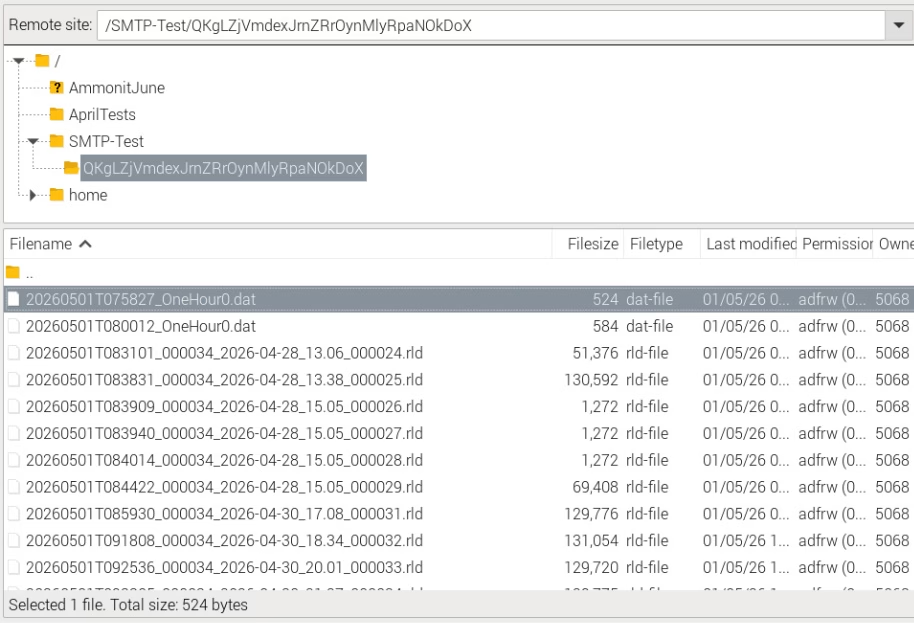
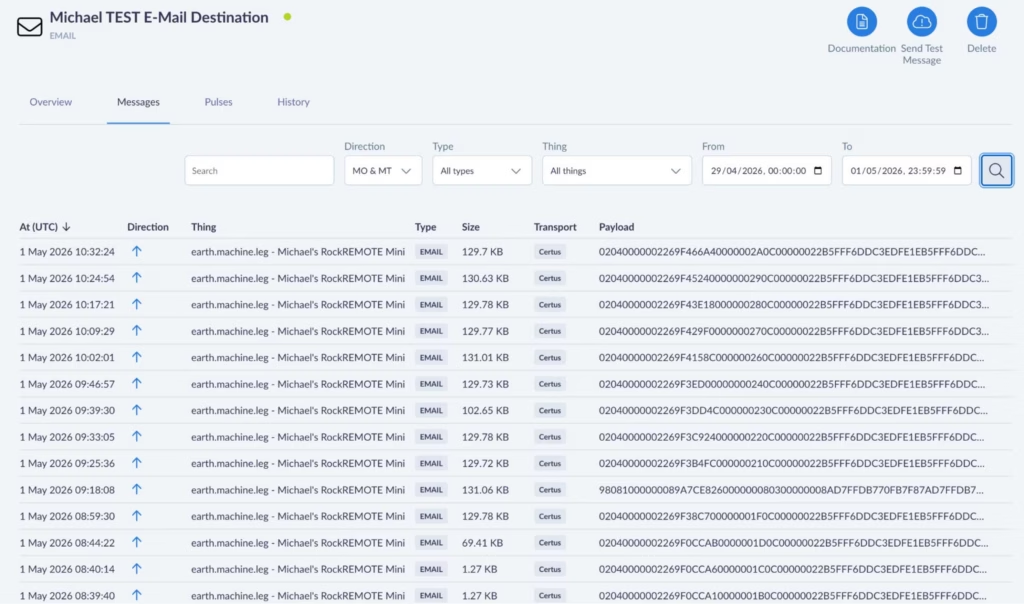
Example screenshot showing an FTP server destination with NRG RLD files and Campbell DAT filesInternally, the Mini compresses the attachment and transmits it as one or more IMT (Iridium Message Transport) messages over the Iridium Certus 100 network to Cloudloop Data. Cloudloop decompresses it and delivers it to your configured destination, which could be an inbox, a webhook, FTP server, an S3 bucket, or any other destination Cloudloop Data supports. Your device never needs to know any of this is happening.
A few key constraints worth knowing upfront:
- Max attachment size: 165 KB
- Recipients: one To field, up to two CC fields
- Authentication: none required (and none currently supported – leave username/password blank) with the exception of NRG Loggers
- Port: 25 only
The SMTP server must be enabled in the Mini’s user configuration file, and you need an Email Destination set up in Cloudloop Data with your Mini in the relevant device group (select Payload, Plaintext, and Assume Destination from Source).
What’s the Point?
Using SMTP isn’t really about sending Email. While it absolutely can be used to send email end-to-end, I don’t really see it as an email feature. I see it as a universal file transport mechanism.
If you’ve worked with SBD or IMT products before, you’ll know that you’re normally just sending the raw data. If that data happens to be a file, it’s then up to your individual applications on both the sending and receiving end to preserve or reconstruct the filename, extension and format, as well as implement whatever message handling, retries and timeouts needed to get it there in the first place.
With the Mini’s SMTP server, we’ve already solved that. Your device simply sends what it thinks is a normal email with an attachment, and at the other end you receive the original file with its filename, extension and format intact.
It’s essentially a one time setup on your side that results in complete files arriving at their destination without having to write any file reconstruction logic – we’ve taken care of that and the internal message handling process for an almost-guaranteed file receipt.
Why IMT?
When your attachment lands at the Mini’s SMTP server, it doesn’t go out over IP; it goes out over IMT. That distinction matters for running costs.
IMT is Iridium’s message-based transport protocol. Unlike IP, it carries no per-packet header overhead, and its minimum billable unit is 25 bytes (1 byte increments thereafter) rather than IP’s 1 KB (100 byte increments thereafter). For periodic data delivery – a file every hour, or once a day – this makes a meaningful difference to your airtime bill over a long campaign. The Mini also compresses attachments before sending, which reduces the byte count further.
For most monitoring deployments, SMTP over IMT is the right choice for scheduled data delivery: low cost, reliable, and completely hands off once configured.
IP and IMT Simultaneously
The Mini runs IP and IMT at the same time. This is worth emphasising, because it means your scheduled data delivery over IMT doesn’t stop you from also using the IP link for other purposes.
The Mini’s public IP (assigned and managed by Ground Control) can be used with port forwarding rules to provide direct access to any device on the Mini’s local network – your logger, your sensor hub, a web interface. These rules are configured either in the Mini’s user configuration file, pushed over the air via Cloudloop Device Manager, or set up via the RockCONNECT IoT BLE app.
Cloudloop NOC also offers whitelisting of public IP addresses that are allowed to reach your Public IP, it’s a block-all by default.
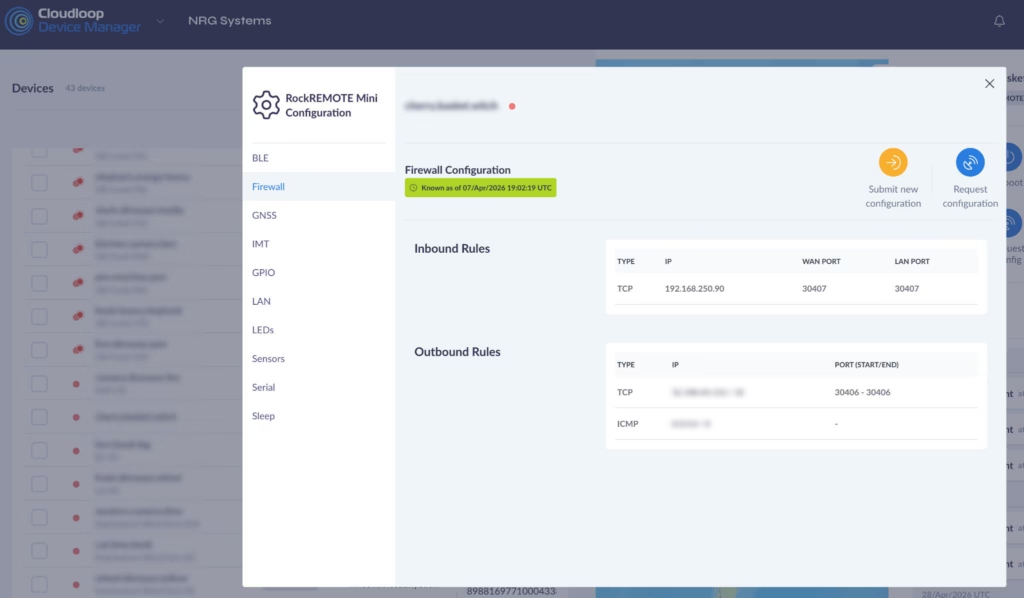
A typical inbound rule – forwarding connections on a WAN port through to a specific device (NRG Logger in this case) on the LAN:
And if the logger needs to initiate outbound connections to a specific server (NRG’s in this case):
The Mini’s IP link runs at 22 Kbps Transmit and 88 Kbps Receive – more than enough for remote access, configuration changes, and live data viewing. IMT handles the low cost scheduled delivery; IP handles everything interactive. You get both, from the same device, on the same Iridium link and with five or more devices you can benefit from a shared data pool.
NRG SymphoniePRO + iPackACCESS
NRG Systems’ SymphoniePRO is one of the most widely deployed meteorological data loggers in the wind energy industry, used globally for resource assessment and power performance campaigns. It has had SMTP data delivery built in from the start, making it a natural fit for the Mini’s SMTP server.

The iPackACCESS is the communications and power module that attaches to the back of the SymphoniePRO. It provides the logger with an Ethernet interface and handles all outbound communications: SMTP delivery of .RLD data files on a scheduled basis, and MetLink connections for interactive remote access via the SymphoniePRO Desktop Application.
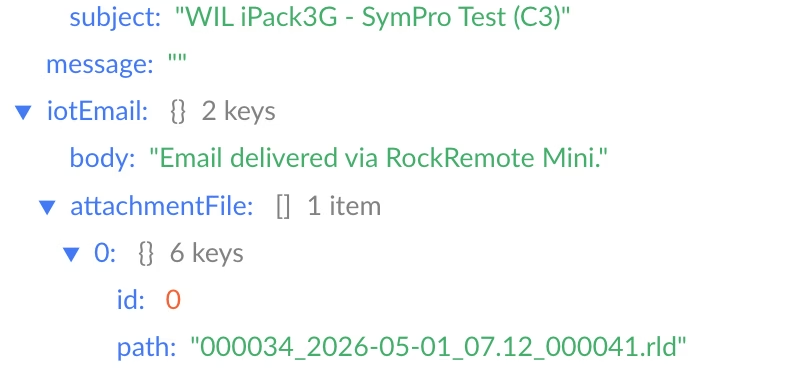
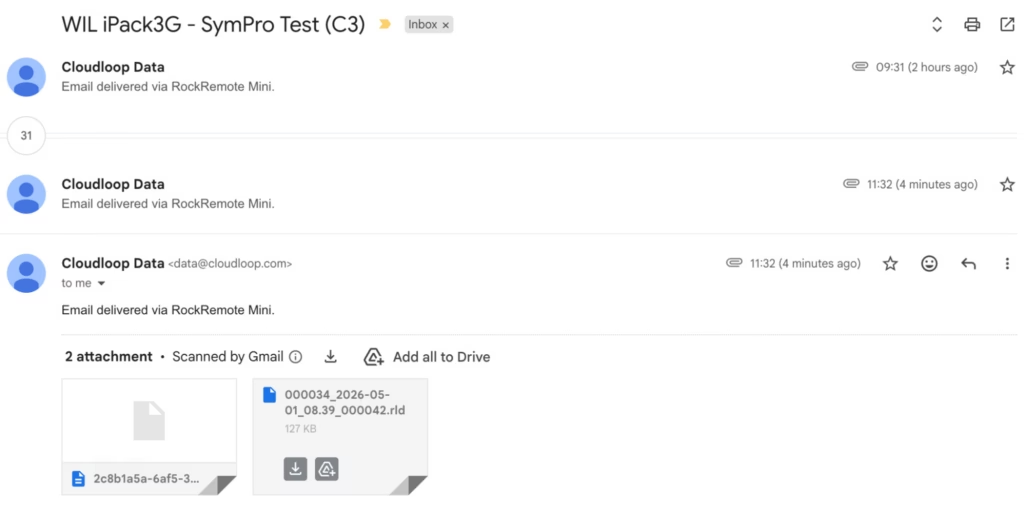
Integrating with the RockREMOTE Mini is straightforward:
- Connect the iPackACCESS’s Ethernet port to the Mini’s LAN
- In SymphoniePRO Desktop Application, assign the iPackACCESS a static IP in the Mini’s subnet (e.g. 192.168.250.90)
- Set the SMTP server to 192.168.250.1, port 25
- The logger delivers .RLD files to Cloudloop Data on its configured schedule, which can then be accessed via NRG Cloud or pulled directly into SymphoniePRO Desktop Application as normal.
For MetLink remote access – live data, configuration changes, manual data pulls – configure an inbound port forwarding rule in the Mini pointing to the iPackACCESS’s LAN IP. If using logger-initiated MetLink, add a corresponding outbound rule allowing the logger to reach your server. Ground Control assigns a static public IP to your Mini; SymphoniePRO Desktop Application connects to that IP on the forwarded port and communicates with the iPackACCESS exactly as if it were going over terrestrial WAN networks.
NRG Systems are trusted partners of Ground Control. They worked closely with us during development of the Mini’s SMTP functionality to ensure it integrates correctly with the SymphoniePRO and iPackACCESS system, so if you’re an NRG customer looking to add Iridium satellite telemetry, they’re fully across this solution and can handle the setup end to end. We’d strongly recommend reaching out to them directly!
Campbell Scientific Loggers
Campbell loggers – CR1000, CR6, CR300, CR800, CR1000X and others – have had the EmailSend function in CRBasic for many years. It can stream data table records as file attachments on a scheduled basis, over SMTP.

Getting a Campbell logger talking to the Mini requires minimal changes to an existing program: set the SMTP server address to 192.168.250.1:25, and leave the username and password fields as empty strings. Your data tables, scan intervals, and field processing don’t need to change at all – just add the SMTP function and the only prerequisite is to have the logger connected via Ethernet to the RockREMOTE Mini and a static or DHCP IP set in the same subnet.
EmailSend with FileOption 8 produces TOA5-format output: headers, timestamps, and record numbers in the standard Campbell ASCII format, compatible with LoggerNet, PC400, and most downstream tools. The time-window arguments let you stream the last hour of records, the last day, or all records since the last reboot.
For remote access, the same port forwarding approach applies. IP at 88 Kbps Receive and 22 Kbps Transmit is more than comfortable for LoggerNet connections – editing programs, pushing updates, pulling live data or on demand table records.
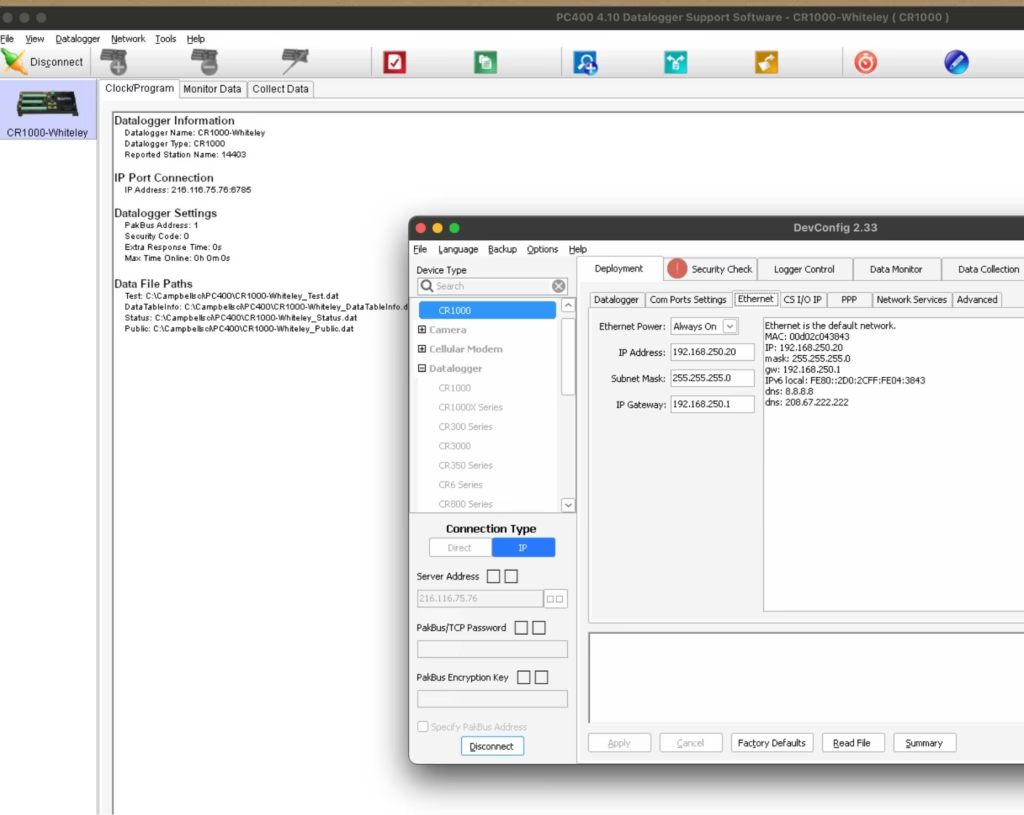
A CRBasic example is available below – I wrote and applied my entire test SMTP program over the Satellite Network! There’s also a more detailed IMT and IP Campbell-specific walkthrough in our previous post.
A Non-Logger! AXIS Cameras
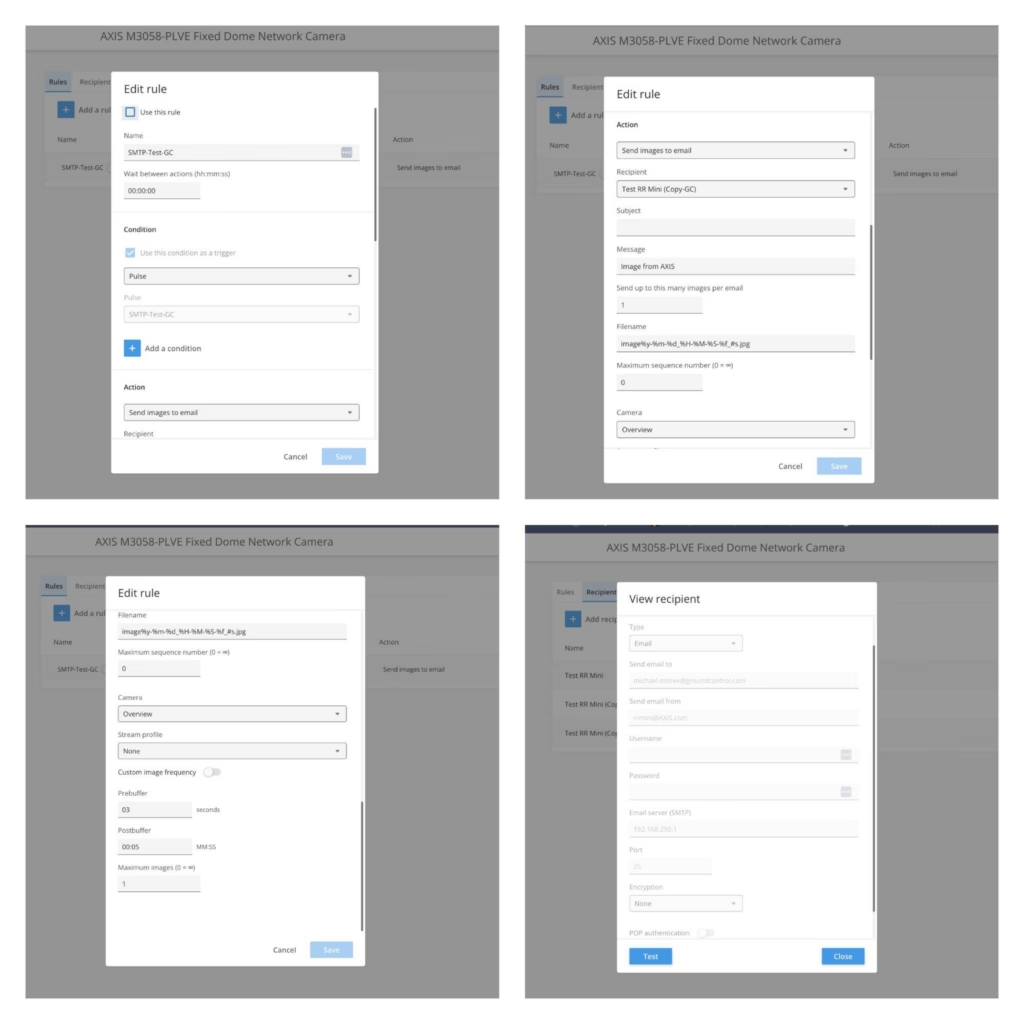
Even though they’re not a logger, AXIS cameras are usually installed next to loggers due security reasons, they also support event-based email delivery with image attachments, which makes integration with the RockREMOTE Mini straightforward. Configure the camera to send images via SMTP to 192.168.250.1:25 with no authentication, and assign it an IP on the Mini’s LAN.

Even though they’re not a logger, AXIS cameras are usually installed next to loggers due security reasons, they also support event-based email delivery with image attachments, which makes integration with the RockREMOTE Mini straightforward. Configure the camera to send images via SMTP to 192.168.250.1:25 with no authentication, and assign it an IP on the Mini’s LAN.
On trigger (motion, schedule, I/O), the camera sends a JPEG image as an email attachment. The Mini receives it, compresses it, and delivers it over IMT to Cloudloop Data, where it is forwarded to your configured destination.
For best results, keep to 1 image per event and avoid high trigger frequency to maintain efficient IMT usage. At the same time, IP can be utilised for live streams if required.
Any Device That Can Send SMTP
The pattern here is simple enough that it applies far beyond branded data loggers. If a device can send a standard SMTP message with a file attachment, it can deliver data over Iridium via the Mini.
That includes Linux systems using mutt or swaks; embedded boards with a TCP/IP stack and an SMTP client library; industrial instruments, PLCs, and weather stations with a built-in email function; or any custom application – a Python script, a shell cron job… Any SMTP client really!
Further Reading
- RockREMOTE Mini overview
- Antenna Mounting and Sky View
- Mini SMTP documentation
- Integrating RockREMOTE Mini with the CR1000
- Cloudloop Data documentation
Discuss Your Integration
Have a specific integration in mind? Our Solutions team works with developers every day to help connect existing equipment over satellite.
If you have a technical question, get in touch via the form, or by emailing hello@groundcontrol.com.