
Those familiar with Go-anywhere Pro know that service is charged per megabyte transferred at around $5 per megabyte. Normal internet use can eat up purchased megabytes quickly if one doesn’t take preventative steps to optimize connected devices.
The following techniques will drastically reduce internet usage and the related emotional/financial stress that comes with using Go-anywhere Pro.
Go-anywhere Pro Optimization Rule #1 – Turn Off All Auto-Updates
Microsoft is the biggest abuser of background auto-updates by transferring data quietly in the background. Turning off these auto-updates should be the first action any Go-anywhere Pro user takes. To turn off Windows updates, go to the Windows control panel and open up the Security Center. Inside you’ll find a selection to ‘Turn Off Automatic Updates’.
Windows 10 and Go-anywhere Pro
Windows 10 doesn’t give the owner the option to stop Windows 10 telemetry which is incredibly unfortunate for those using Go-anywhere Pro services.
However, some steps can be taken to reduce the blue-sky ‘everything is transmitted’ to control usage costs. We recommend all Windows 10 users make their Go-anywhere Pro terminal wireless connection a ‘Metered Connection’. This one action cuts the Windows telemetry to only critical updates – here are instructions.
We also recommend these steps in configuring a Windows 10 PC to limit usage to a bare minimum. One can delay updates for 35 days using this option (note this is for windows Pro versions or higher). Incredibly, the default setting of Windows 10 makes a computer a peer-to-peer transmitter of Windows 10 OS upgrades available to nearby computers to potentially transmit gigabytes of data over many months without the owner’s knowledge. If you need a hand, we offer an optimized Windows 10 laptop for $750 that tames Windows 10 as much as possible.
Turn off Auto-Update Options on Other Programs
Auto-updates in such programs as Adobe Reader are easily disabled. Simply search for information for disabling auto-update on all programs that are running on your computer.
Go-anywhere Pro Optimization Rule #2 – Use a Smartphone or Tablet When Possible
Close all apps that you’re not using. For those that are running, turn off their background internet connectivity (auto-updates, push notifications) from the specific app control panel.
The good news is that the default configuration of many smartphones and tablets use significantly less data than laptops. For example, email programs will only download the headers of the email and only when you click on each individual email does the body and any attachment download. Also you can install the amazing Opera Mini browser app that can cut 90% the data transferred over a browser. So, the two biggest uses of the Internet (email and web browsing) can be highly optimized for very low data use over Go-anywhere Pro.
Go-anywhere Pro Optimization Rule #3 – Authorize Internet Connectivity (Over a PC)
There are programs available that monitor your connection to the internet and will alert you when some program initiates a connection. ZoneAlarm is a free firewall program that alerts you with a pop-up window – you select if you wish that program to connect or not.
Go-anywhere Pro Optimization Rule #4 – Optimize Email (Over a PC)
Many of our Go-anywhere Pro clients are most interested in using their email connection to transfer images and files as well as to communicate with their organization. Email works fine over a Go-anywhere Pro connection and often it isn’t necessary to optimize.
However, there’s a simple trick with email where you set the mail client to ‘Download Headers Only’. By doing this, an email client will only download the tiny headers of each email and not its body or attachments. Emails are read by clicking on them to start the download of that email. This little trick saves a tremendous about of data being transferred and is superior to Webmail – although Webmail isn’t too bad because while you’re downloading images from the Webmail page, Webmail doesn’t download email attachments without first clicking on it.
If your email client doesn’t have the option to ‘Download Headers Only’, we recommend using Thunderbird, a free email client from Mozilla, the makers of Firefox.
Go-anywhere Pro Optimization Rule #5 – Browser Optimization
Choose the right browser – Laptops
With Go-anywhere Pro, not all browsers are the same and we’ve found that Firefox with a special add-on lets one toggle on-and-off browser elements like Javascript, Java, flash, animated images, or even all images (another huge reduction of data). Please search for ‘Image video block’ and ‘Policy control’ in the Firefox add-ons section. These may help.
Smart devices – iPhones, iPads, Android phones
Smart devices can download the Opera Mini browser that has the wonderful feature of low-bandwidth configuration. There are settings inside the Opera Mini browser that resample images and make them smaller. Take some time to learn the optimization functions of this powerful browser. If there were ever a browser made for Go-anywhere Pro use, Opera Mini has our vote.
Install Ad-Blocking Software for Web Browsing
Another line of defense is installing ad-blocking software on your laptop or device. Many of today’s websites are ‘cramming’ ads and other java scripts that are making website page sizes two to 20 times larger than the content you’re interested in reading/viewing. A few animated .gifs or video ads can blow through megabytes.
There are a lot of popular programs out there for laptops and smart devices and it’s worth a few dollars (to save on many more $$ spent on Go-anywhere Pro service), by using good ad-blocking software. We recommend a program like Adblock Plus.
Turn Off Browser Images (Optional)
While the QuickJava option (shown above for Firefox) lets you toggle images on-and-off at the click of a mouse, an alternative uses your preferred browser to turn off images from downloading.
The configuration is different for each browser, but for Internet Explorer, click on the ‘Tools’ menu option and select ‘Internet Options’. From the window that appears, select the ‘Advanced’ tab. There are a host of things you can turn off, but the most important one is about two-thirds of the way down. Uncheck ‘Show Pictures’ and then click ‘Apply’.
Images are only part of what is being downloaded from any web page and we do recommend using QuickJava Add-On with Firefox for the best results.
Go-anywhere Pro Optimization Rule #6 – Monitor Usage
By becoming familiar with how much data being transferring over a Go-anywhere Pro connection, you can estimate the remaining balance before a Go-anywhere Pro SIM suspends.
Use the Go-anywhere Pro Terminal Web Interface Usage Screen
All Go-anywhere Pro terminals have a web interface that shows and approximate amount of data transmitted over the satellite link. We can’t stress enough to become familiar with the interface of your Go-anywhere Pro terminal and locate the usage screen. All Go-anywhere Pro user manuals show how to find and read this screen, which will show inbound and outbound traffic in megabyte or kilobytes, and often the number of minutes a phone call was made inbound or outbound.
To access the web interface of a Go-anywhere Pro terminal, type in this IP address from any connected browser:
- Hughes: 192.168.128.100
- Explorer: 192.161.0.1
- Wideye: 192.169.1.35
We recommend to bookmarking the web interface on your browser.
Use network monitoring software
Glasswire is a free bandwidth-monitoring program for a PC or Android that shows how much data your system is transferring real-time in both directions. We recommend using it before you use a Go-anywhere Pro connection to gain a fairly accurate estimate of usage when connected to the Internet, as well as when you’re using an Go-anywhere Pro terminal. A great tool to have on hand.
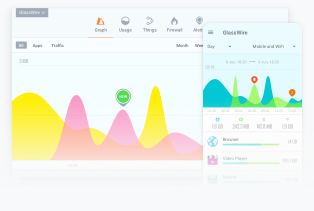
Glasswire is a free app that can be downloaded at glasswire.com.
Other Go-anywhere Pro Optimization Tricks
Make Sure the Terminal is Pointed Well
The higher the accuracy, the fewer dropped IP packets and information being retransmitted over the satellite link.
Close Unused Programs and Apps
Many programs auto-start on PCs or stay running on smart devices. To prevent them from communicating over the internet, simply turn them off. On smartphones, become familiar with how to close all running apps. With iPhones, quickly press the home button twice to show all running apps. ‘Swipe up’ to close them individually. If in doubt, reboot.
Use Wireless Security or Disable Wireless Access
Most Go-anywhere Pro terminals have integrated Wi-Fi, so make sure to enable wireless security to prevent unauthorized access. If you don’t require your Go-anywhere Pro terminal for Wi-Fi connectivity, you can turn Wi-Fi off from the terminal web interface. Turning off Wi-Fi has the added benefit of saving on battery power on the terminal.
Don’t Leave a Connected Computer Unattended
Some web pages will refresh when unattended. Either close down all browser windows or, better still, disconnect the computer from the Go-anywhere Pro terminal to be 100% sure no information is able to transfer over the Go-anywhere Pro link. You may also turn off the Go-anywhere Pro terminal if you don’t expect a phone call over it.

The bottom line
If we can help you further, please call or email us, or complete the form.